


At Timescapes, we believe the key to achieving better construction project outcomes is to leverage the power of visual data. In the second half of 2023, we focused on providing even more actionable construction insights to support your goals of delivering projects better, faster and safer.
In these release notes, we’re excited to unveil the top features added to our platform in the past six months.
1. Plan to Project Progress Comparison: Integrated views of project images and the 3D BIM overlay
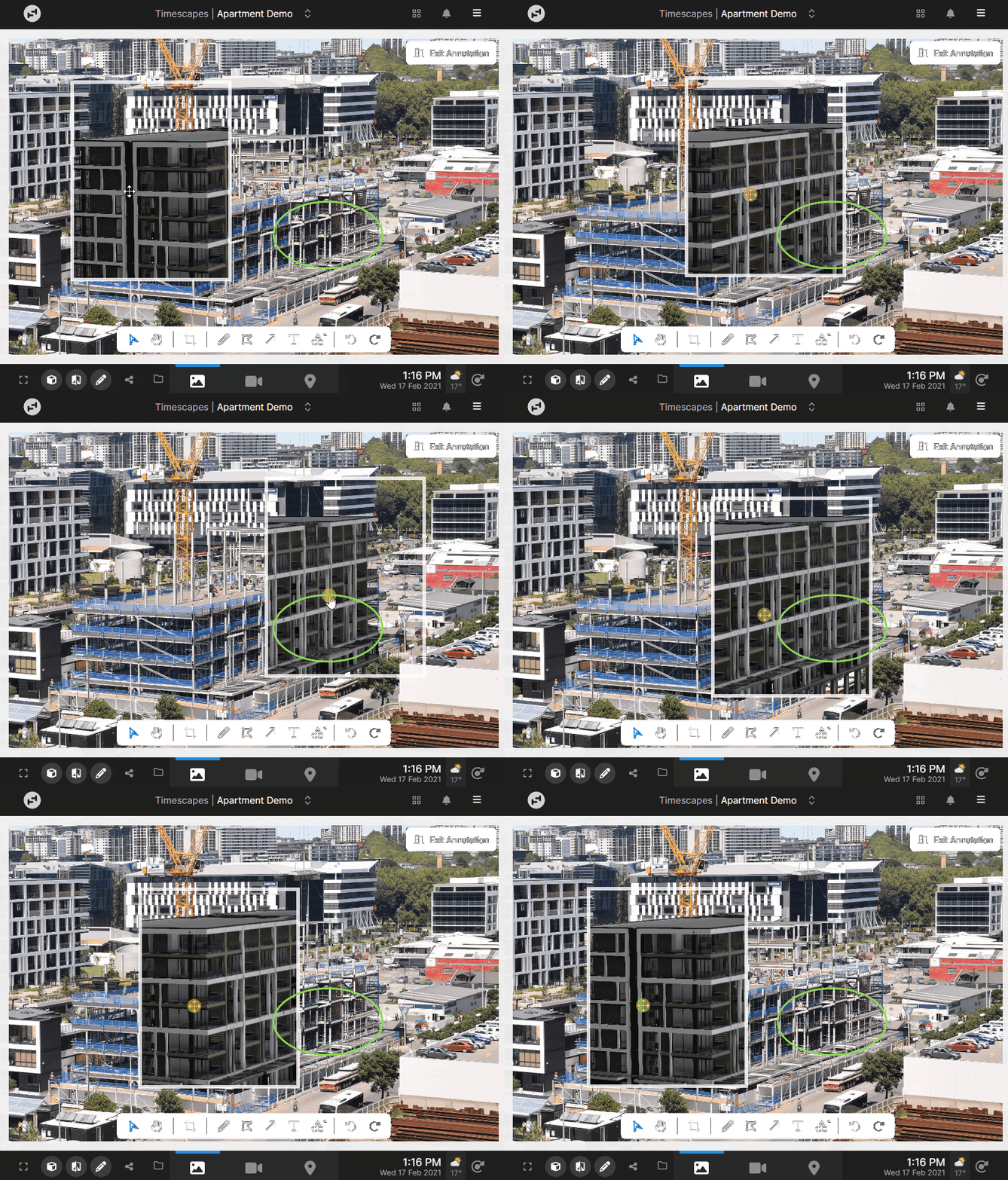
The combined image tools feature allows users to interact with project images, the image compare view, and 3D BIM overlays all in one place. Use the X-Ray tool to select a specific area of construction you would like to see at different stages of the project or compare with the 3D model. You can also add annotations to the chosen image or BIM view and seamlessly download, email, or share marked-up images to Procore.
2. Daily Log: Streamline and improve record keeping with a summary of daily site activity and conditions

Daily log combines personnel, plant, and equipment activity captured from site and measured weather conditions in one summarized record. Improve the accuracy of site activity record keeping and reporting by verifying manual sign-in sheets. Generate automated site reports by selecting a custom time period (e.g. monthly) for the log’s data.
To view the Daily Log, open the Analytics feature and click the Daily Log button on the left hand panel. This shows a summary of the selected day or time-range. You can also bulk-export the data to Excel for the specified time-range.
3. Exclusion Zones: Ensure personnel compliance with exclusion zones

Define exclusion zones on your construction site and get insight into instances when personnel are detected within those areas. By identifying exclusion zone violations, you can address the infraction and improve the health and safety culture on site.
If you wish to activate this feature, contact your Account Manager and they'll assist in setting up the exclusion zone areas.
4. Thresholds for Site Conditions: Easily identify where adverse site conditions have impacted operations

Project Admins can now define project Thresholds for weather and any other site data captured by Timescapes-integrated environmental sensors.
Admins and Power Users can seamlessly see where their thresholds for noise, dust or weather conditions have been exceeded on the Analytics dashboard, and can click through to view a timelapse or images of the breach period.
This enables you to easily identify where adverse site conditions, like weather, have impacted operations and provide visual evidence of the activities leading to situations where noise, dust, or vibration were above acceptable levels.
If you have any questions about our new features, we encourage you to contact your Timescapes Account Executive or Account Manager.
We hope these enhancements will give you more information to make decisions about how to lower costs, reduce schedule delays, manage risk, and communicate more effectively with your team and stakeholders.