



In this dynamic era of construction site management, staying ahead of the competition requires industry expertise as well as smart tools and technology that provide you with the critical insights you need to build better, faster, and safer.
Our commitment to innovation drives us to continually enhance the Timescapes platform to deliver more project insights to you.
In these release notes, we’re excited to unveil the top features added to our platform in the past six months.
1. Job Site Analytics: Save time and costs across projects with AI-powered visual insights
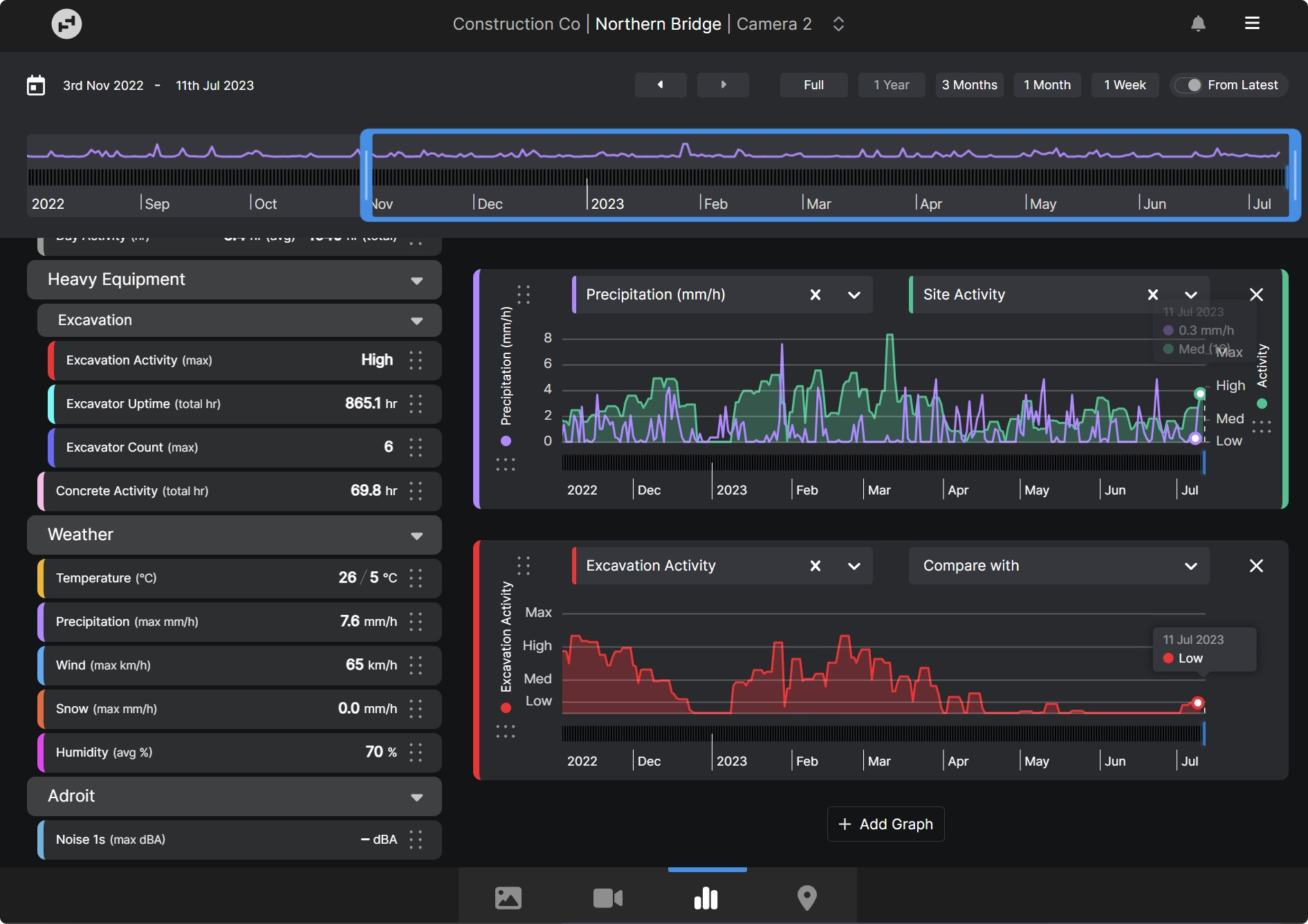
Get the critical insights you need to be able to improve processes, reduce delays, lower costs, and mitigate risk on your project. Job Site Analytics use Artificial Intelligence (AI) and Machine Learning to automatically analyze and extract information from your timelapse images. Provide real-time data and highly customizable reports to anyone on the project team.
Audit personnel counts, concrete-truck delivery times, and plant and equipment activity for assets such as excavators, cranes, trucks and more. View historic weather records over the life of a project and create customized reports to demonstrate the impact on site activity, idle machinery, rescheduled concrete pours, and more. You’ll have the irrefutable visual evidence you need to resolve dispute claims quickly.
NOTE: Weather data analytics are available with Timescapes’ Standard license. Personnel, concrete truck, and plant and equipment analytics are available with Timescapes’ Professional (Enterprise) license and accessible to Power Users and above.
2. Multiview: View all your Timescapes cameras in one place

Multiview allows you to start your workday by quickly reviewing all your cameras in one convenient location. Get a high-level overview of your projects, remotely view work that has been completed, and easily identify areas that need to be investigated further.
You can select which cameras are visible on your multiview, change the size of each view, and drag and drop to adjust the order. Easily navigate to a single camera view to dig deeper into one area of your project by simply clicking on the desired camera in the multiview screen.
3. Annotate: Mark up images and instantly share them with the project team

Add critical or explanatory notes or comments to images directly within the Timescapes platform and instantly share them with project stakeholders. Simply load the desired image to draw lines or shapes and add labels or text. You can then download the marked up image, share it via email, or send it to Procore.
The Annotate feature allows you to review work, highlight areas for health and safety, discuss hazards, and make note of specific events or things that need to be recorded or changed on site.
NOTE: Annotate is only available with Timescapes’ Professional license.
4. Email Subscriptions: Automatically receive images or timelapses in your inbox or Procore

Keep your project team up-to-date on progress by automatically sharing images or timelapses to your inbox or your project management software. You can choose to automate the communications weekly or monthly on the days of your choice.
Never miss a moment on your job sites with email subscriptions. Keep building owners or developers in the loop on project progress with automated communications. Send an image or timelapse out at the same time every day for project updates or daily log reporting.
We hope these enhancements will give you more information to make decisions about how to lower costs, reduce schedule delays, manage risk, and communicate more effectively with your team and stakeholders.
If you have any questions about our new features, we encourage you to contact your Timescapes Account Executive or Account Manager.